Monday, March 6, 2017

Parts 4 & 5:  Combining Predictive Coding and Search Term Classification in 5 Easy Steps

By Mark G. Walker, VP Advisory Services and 
Robin Athlyn Thompson, VP Marketing | Business Development

By popular demand, we are releasing Steps 4 & 5 together.  In case you missed Part 1, you can find it here.  You can find part 2 here, and part 3 here. 

Introduction to Steps 4 & 5.


Steps 4 & 5 are frequently performed in parallel.  When available, predictive coding is beneficial in validating key terms. 


Step 4:  Validate Key Terms Before You Agree to Them


There are those of us who have spent decades developing key term validation protocols, keeping the attorneys involved on task, and hopefully convincing them not to agree to poor key terms.  Poor key terms can, and frequently do, return 70%, 80%, even more than 90% documents that have little or no value to the case.  Key terms are usually overly broad.  In the search-world we call this “over-fitting,” A certain amount of over-fitting is desirable, as you don’t want to be too narrow with key terms as something can be missed.  On the other hand, you don’t want to be too broad, because the more you must review, the greater the cost and the more likely it will be that the opposition will fuss about dumping.  Not that dumping ever happens in this business!  Just like Goldilocks and the three bears, we’re aiming for key terms that are just right. 

There are entire protocols and technology features dedicated to validating search terms.  Oversimplified, a search term validation process is one that is repeatable and contains quality control measures.  Documents hitting a proposed set of search terms are “sampled” and those samples are reviewed and scored.  

Key Term
Hits Sampled
Tagged Relevant
% Relevant
Diamond
100
20
20%
Joe
100
10
10%


Imagine a case about a fictional restaurant called Diamond Joe’s.  The restaurant chain is owned by the fictional company Diamond Joe Holding.  The majority shareholder is the fictional Joe Diamond.  Joe owns an interest in many companies, some completely unrelated to the subject of the litigation, the restaurant chain.  Joe owns a diamond mine in South Africa – Joe’s Diamond Mines.  Joe also owns a chain of jewelry stores in South Texas and Mexico. Finally, Joe owns a minor-league baseball team named, you got it – The Diamondbacks.  As you might imagine, searching Joe Diamond’s email collection along with 50 of his employees will yield a great number of “false positives” using the terms diamond and Joe.  Of course, that seems obvious in this example, but there are many terms that have multiple meanings and depend on context.   Sampling hits of those terms, along with any others you have, will eventually ferret out which terms can be changed by, dropping some terms like Joe and diamond, and/or adding other terms, proximity connectors and other tweaks to existing and new terms.  Search term validation protocols are very effective in doubling and even tripling the relevancy rate of documents that you ultimately must review.  The cost savings is dramatic because even without leveraging advanced technology outlined in Step 5, far fewer documents are reviewed and of those reviewed; far fewer are of no value. 

On large projects, search term validation protocols can be tedious, but are necessary.  Your protocol must be repeatable, reportable, and iterative with validation and verification.  While sound key term validation protocols get you to the same place, the road is much shorter when you measure key term effectiveness as you conduct your sampling using the advanced analytics and strong key term reporting as outlined in Step 5.

Step 5: Leverage Smart Technology


Before classifying ESI in an analytics engine, perform any additional objective filtering that you can to eliminate ESI that has no value in a text classification engine, or is known to be irrelevant.  As previously discussed, audio and video files, image only file formats can often be eliminated from classification.  Eliminate ESI that may have survived prior filters, and sometimes can more easily be identified once in the review platform where predictive coding is delivered and available.  Establish a separate work flow for files that can’t be classified. If your using the right technology and provider, this will be part of their standard process, but be certain.

Advanced analytics, such as predictive coding or machine learning, is not new.  The technology and methods that underlay analytical engines has been in use, well, since computers to run them have existed.  In eDiscovery and Information Governance software platforms, predictive coding technology has been available for well over a decade.  However, it is only recently that lawyers and judges have truly begun to become comfortable with Predictive Coding technology and associated workflows.  Predictive Coding is a large bucket of all types of analytics tools, all of which are useful for different reasons.  Here, however, we are focused solely on machine learning.  Machine learning (ML) is the sub-field of computer science that gives computers the ability to learn, without being explicitly programmed (Arthur Samuel, 1959). (Samuel, 2000)  ML evolved from the study of pattern recognition and the computational learning theory in artificial intelligence. (Encyclopedia Britannica, n.d.)  Sounds a bit like rocket science?  Well, at its core, technology built on machine learning is full of complex algorithms, equations, hyper-planes and all kinds of complex things that frankly none of us really need to understand.  To someone like me, it is rocket science.  What we do need to understand is this: ML allows you to review samples of documents, mark them relevant or not relevant, and the technology will classify everything based upon human review of those exemplars.  The technology finds everything that is like those documents that are marked as relevant or not relevant.  Like any evolving technology, however, you must make sure you have a basic understanding of the technology you intended to use.  

Many of the ML engines used for predictive coding today were not originally built for predictive coding.  They were in fact built on methodologies and algorithms intended for concept classification analytics and visualization (reporting) of concepts.  The clear majority of the predictive coding engines on the market today, are passive learning applications.  Passive learning applications classify ESI as a snapshot in time.  You then review representative conceptual samples from the target population that are randomly selected by the application you are using.  Once the sample is reviewed, the ML engine determines what it thinks is relevant or not relevant based on that snapshot.  Many samples are reviewed in this process, and sometimes many re-classifications must occur.  Because a passive engine is a static snapshot of the data, samples must be larger in number, and there are many starts and stops as you train the machine to determine what is relevant as opposed to what is not relevant.  Like search term validation protocols without ML, with passive ML you get to the same spot down the road as an active learning ML, it just takes you longer to get there.  One has to review dramatically more samples and you must have substantial assistance to conduct reclassification and to measure stability.”  Stability is that point where you know that the machine has learned all it is going to learn from samples, and it is time to stop training and conduct quality control audits.  Determining stabilization in a passive learning based tool can be challenging.


Active learning ML-based technology is different.  Active learning engines are usually based upon binary methods and algorithms such as Support Vector Machine (SVM), for example (Saha, Hasan, Burgess, Habib, & Johnson, 2015).  Active learning changed the game with respect to speed and efficiency.  The biggest advantage to the consumer, is that the engine continually and “actively” reclassifies what is relevant as the sample review is being conducted.  With the right active learning engine, this reclassification happens virtually in real time no matter the number of reviewers.  Feedback on how you are doing is also immediate and continuous.
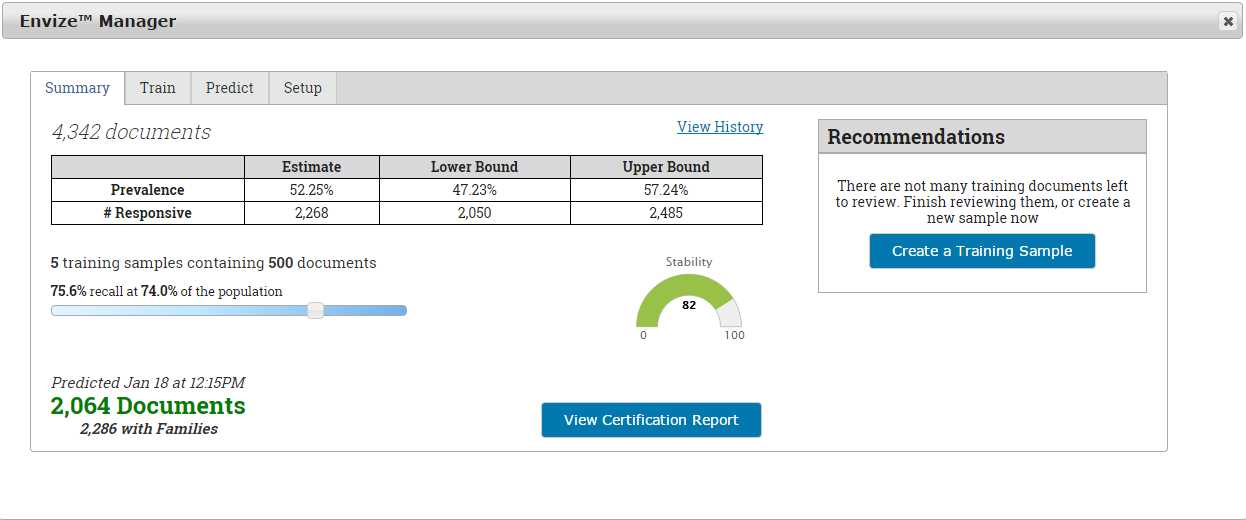


So how does ML help with the all-important key term validation?  Simple: because the classification engine is classifying all documents in a targeted ESI population, allowing you to grade the effectiveness as you go, you have real-time feedback on search term effectiveness - assuming, of course, that the technology you are using has strong key term hit reporting.  With ML you are not limited to just the sample documents that you review.  The machine takes what has been reviewed, and then extrapolates that to the entire population of data.  Your search term hit report can then provide a relevancy hit rate across all data, not just what has been reviewed.  As learning stabilizes, so too do the key terms, allowing you to quickly determine which terms need work.  The technology will often suggest terms by showing you those terms that are most common in relevant documents.
Once learning has stabilized, follow a well-established audit sample review to make sure that you agree that the learning has stabilized.  It is then time to move on to privilege review and production.

Conclusion


Well-established filtering, key term validation and machine learning workflows are becoming common place and for very good reason – combining the two has proven over and over to save considerable time and money by eliminating ESI that has no value.  In our world, time is indeed money.  

References


Enclycopedia Britannica. (n.d.). Machine Learning. Retrieved from Britannica: http://www.britannica.com/EBchecked/topic/1116194/machine-learning
National Institutes of Standards and Technoloy. (n.d.). National Software Reference Library. Retrieved from National Software Reference Library: https://www.nist.gov/programs-projects/national-software-reference-library
Saha, T., Hasan, M., Burgess, C., Habib, M., & Johnson, J. (2015). Batch-mode active learning for technology-assisted review. Big Data (Big Data), 2015 IEEE International Conference on (pp. 1134-1143). Santa Clara, California: IEEE.
Samuel, A. (2000). Some Studies in Machine Learning Using the Game of Checkers. IBM Journal of Research & Development, 44(1/2), 207.

Wednesday, March 1, 2017

Part 3:  Combining Predictive Coding and Search Term Classification in 5 Easy Steps

By Mark G. Walker, VP Advisory Services and 
Robin Athlyn Thompson, VP Marketing | Business Development

This week, part 3 of our 5-part series on combining search term classification and predictive coding. In case you missed Part 1, you can find it here.  You can find part 2 here.  


Step 3: Process the Good Stuff


Once you’ve eliminated everything that you can objectively eliminate, it’s time to process.  Processing is the act of extracting metadata, content, indexing, analyzing and staging ESI for review/production.  Some steps, such as indexing content, can be a second or third stage, depending on the service provider’s capabilities.   The first stages of ingesting ESI is often referred to as pre-processing.  As noted in Step 2, all container files are opened, and individual files are created during processing.  Emails and attachments, for example, are pulled from the PST container and presented as individual files rather than a single container file.  

Once processing is complete, apply your “objective” filters identified in Step 2 again so that you can identify files coming from containers that can be suppressed from downstream processes.

Unlike prior workflows centered on applying search term filters at this stage, you SHOULD NOT filter by search terms during processing, unless you’re using terms that are validated using a process outlined in Step 4 and will not change going forward.  Even those of us expert at developing search terms should remember that using those search terms during processing may result in pulling a large percentage of irrelevant documents.  The fact is we can’t be certain how well search terms perform until we perform sample review and testing.  At minimum, we encourage you to perform these minimum tasks discussed here.

Finally, as processing extracts domains, we recommend you seek a report of domains present in the ESI and filter-out emails from domains that are clearly junk.  Emails from cnn.com, for example, may be clear spam emails.  Some processing applications have rudimentary review and tag functions designed precisely for this purpose.  Be careful, however, as anything you do in terms of filtering during processing can have a negative impact downstream.  Regardless of whether you filter out junk domains during processing, you will want to do that step (again if you did so during processing) once the ESI resides in the review/analysis platform. Here are a few things to consider during processing.  This is not intended to be an exhaustive list. 

  1. Apply Objective Filters – Apply again any objective filters that where applied during Step 2.
  2. Consider “Pre-Processing” steps – It may dramatically speed up processing to utilize a multi-stage processing work flow.  For example, you may not want to extract text and conduct indexing on files that may be filtered out.
  3. Be Careful with Search Terms - Before applying search term filters during processing, consider very carefully the consequences.  There are serious ramifications to deduplication, for example, if your search terms change and you receive new data that may apply a different set of terms.
  4. Domain Filters – identify junk domains and eliminate files associated with clearly junk emails.

Stay tuned next week for Part 4:  Validate Key Terms Before You Agree to Them

Wednesday, February 22, 2017


Part 2: Combining Predictive Coding and Search Term Classification in 5 Easy Steps

By Mark G. Walker, VP Advisory Services and 
Robin Athlyn Thompson, VP Marketing | Business Development

This week, part 2 of our 5-part series on combining search term classification and predictive coding. In case you missed Part 1, you can find it here.

Step 2: Dump the Junk

ESI collections include acquisitions of ESI from laptops, 3rd party sites, file servers, wherever users keep potentially relevant ESI resides. In some cases, entire user hard drives are collected. In other cases, just user files are collected. Whatever the collection method, thousands, millions, even billions of files are collected. Experience teaches us that less than 1% of information collected will prove to be valuable to your case. There are an enormous number of collected files that are of no value. Here are three common objective filters that can be applied to eliminate known garbage before you do any downstream indexing, analysis or classification. This is not intended to be an exhaustive list.
  1. De-NIST – NSIT is an acronym for National Institute of Standards and Technology. The National Software Reference Library (National Institutes of Standards and Technology, n.d.) is a sub-project of NIST which collects a master list of known computer applications to help maintain the known list of application and system files. To De-NIST means you use these resources to eliminate what are known application or system files that have no value in most cases.
  2. File Type Filter - Eliminate known file types outside of NIST. In most cases, an inclusive file filter ingests into processing only specific file types of interest. Audio, video, image and other specific file types may be set aside, or not used at all. These file types are very heavy, driving up cost, contain little or no text content and are difficult to analyze, often requiring a different process and workflow. Create a special process for audio/video files that may be relevant. Your eDiscovery budget will thank you.  
  3. Date Range Filter – We would urge caution when applying a date filter BEFORE processing. Processing is the act of extracting metadata and content. This process also expands container files such as email archive PSTs and ZIP files. If you apply a date filter before processing, and container files are being processed, you are virtually guaranteed to miss files of interest. By way of example, if you create a PST archive of my email today, it will contain months and even years of email, yet the date of the PST will be today’s date. If your date range filter does not include today’s date, that PST will be eliminated from processing consideration, even though email within the date range are inside the email archive.
Next week: Part 3 "Process the Good Stuff"

Wednesday, February 15, 2017


Combining Predictive Coding and Search Term
Classification in 5 Easy Steps

By Mark G. Walker, VP Advisory Services and
Robin Thompson, VP Marketing and Business Development
iControl ESI

This is the first step in a 5 step series...Stay tuned for Step 2 next week.

Introduction

So many of our colleagues in this industry have spent decades persuading lawyers and their staffs to adopt technology and use powerful search and conceptual classification to efficiently and effectively manage eDiscovery projects.  Just last week, an attorney referred to predictive coding as a “new thing,” saying “So, Walker, you’ve been hammering home that we should do a better job with search terms, now comes this new thing “predictive coding”– what is this again and why do you recommend we change gears?”  That became the writing prompt to distill our advice on this subject to these 5 simple steps to make your team a pro. 
Those of us who support leveraging advanced analytics technology, such as predictive coding, are not suggesting a shift of the gears.  Well, at least not some of us.  Technologists (primarily) have been trying to move lawyers away from the use of key terms as “objective” filters for some time now.  A decade or so ago, conceptual search emerged in legal software.  In 2017, the most common exchanges of filters in agreement among the parties are date range, file type and search terms.  These search terms are tangible and objective things that the parties can exchange, and will behave essentially the same irrespective of what platform is being used by the parties to perform search.  For example, a search for the term “diamond” should yield the same number of documents hit whether your platform uses DT Search, Apache Solr, or some other search engine.  For better or worse, we’ve made lawyers like search terms.  Convincing attorneys to like search terms has taken us decades, so let’s not waste the effort!  The use of advanced machine learning technology, reporting, and – yes - math, will make those objective terms better.  These steps are not intended to be a comprehensive list of every step and task that should be performed on cases involving Electronically Stored Information (ESI), as there are literally entire books devoted to this topic. Rather, this is a short list of those mandatory tasks that should be performed on virtually any case of any size.

Step 1: Identify the Witnesses, Preserve and Collect the ESI

The process begins with legal hold to make certain that relevant documents/ESI doesn’t disappear.  Legal holds can be issued across an organization, or to only those that are anticipated to have relevant information and facts.  There are web-based legal hold solutions that will not only automate the process of creating legal hold, but will also help monitor compliance and profile what information the witness(es) might have that is relevant BEFORE you must gather their files. 
The exercise of “profiling the data” of a custodian is a great way to determine what a specific witness has on their computer, inside email stores, file shares or where ever relevant ESI may exist.   Data profiling applications work by reading metadata to determine file type, size, counts and so on.  This information can be very handy in determining the cost of collecting, processing, and reviewing, and helps in forecasting a budget, defending against a potential motion to compel, or seeking protection against overly broad requests -  as if that never happens!  Step 1 should include the following, at a minimum:

1.  Identify witnesses that may have relevant information;
2.  Issue a Legal Hold across the organization or specific to witnesses that are known to have relevant information.  Many legal hold applications also provide the ability to create, send and track customizable fact based questionnaires;


3.  Monitor Compliance with the issued legal hold.  We highly recommend using an automated notification and monitoring;
4.  Profile the Data of witnesses who may have relevant ESI.  Profiling the data will determine what ESI witnesses have, or have access to and will help with precise cost estimates. 


5.  Preserve and/or Collect ESI.  If an organization has "preserve in place” capability, preserve ESI for those witnesses that are expected to have relevant ESI.  Preserve in place is the ability to prevent the deletion of email for specific custodians, for example.  Some companies use “journaling” as a way to preserve in place.  If the ability to preserve in place isn’t available, collect the ESI as quickly as possible.  The longer you wait, the more likely it is that relevant information may disappear, increasing the risk of spoliation.  The delete key is not your friend!  Preserve and collect broad -- collecting ESI is the least expensive part of the process.


Next week we will cover Step 2: Dump the Junk. Your comments and opinions are welcome.

Thursday, November 10, 2016


Why the Pundits Failed to Predict Trump

Contributing bloggers:  Susan Kavanagh and Mark Walker

Democrats and Republicans alike are looking back at this election and saying “how did we miss this?”  Democrats took great pride in their “analytics,” and much of how Hillary positioned herself to the public was based upon polling and analysis of polling.  Obviously, the polling was not accurate, so the entire Democratic strategy based on these analytics was – well -- way off base. In the Trump camp, Donald J. simply ignored the polling, and went with his gut.  Turns out Trump’s gut was right and the Democratic pundits were wrong -- really wrong!  Here’s what happened.
In order to understand at a very high level how this technology works, some background is necessary.  In our world of litigation, we use analytical algorithms that were originally developed for political polling.  In fact, the FBI used the very analytics we use here every day to analyze email in connection with the Clinton email investigation.  That is called “eDiscovery.” 
Those of us in the eDiscovery industry have struggled for years with telling family or friends “not in the business” what it is that we do for a living.  Our elevator pitch for our customers, mostly attorneys, goes something like this: “We help pull ‘Electronically Stored Information’ (ESI) from your client’s servers, process it, analyze it and then use analytics so you can decide what to produce, or, if you are the receiving party, decipher what is important.  Well, actually, most lawyers just know what eDiscovery is, albeit at a very high level.  Actually, most don’t really want to know how the sausage is made.  They are simply interested in the result.
Explaining to family and friends what eDiscovery is, is an entirely different matter.  Sometimes I just say I do data forensics with stuff like email.  “You do what with email?” they ask. Then the explanation would go something like “we collect electronic data from corporations, process that information and then using ’high-tech’ we help the lawyers find what’s important among what is usually stored in a great sea of information.” Most folks don’t really have any point of reference because they almost never deal with lawyers and certainly don’t have anyone looking at their email (or at least they think they don’t). 
Enter the Hillary Clinton email scandal.  Now we have a point of reference that pretty much everyone has heard of and directly involves eDiscovery, identical to what I do day in and day out.  At some point, someone – likely a service provider like the company I work for – collected Hillary’s email from her private email server.  That service provider then processed the email.  When ESI is processed, information about that data is extracted from those files.  A great deal of information is extracted beyond just the text of the email.
So, how is this relevant to the email scandal and the new information from the FBI?  Reports vary, but Hillary appears to have produced approximately 30,000 emails to the FBI.  The FBI apparently reviewed those, and decided not to recommend prosecution to the DOJ.  Then, on Friday October 28, the FBI announces that it has found more email (roughly 650,000) that “might be relevant” to the Clinton email investigation, and that it “needs time” to sort it all out.  This email was found on the laptop of a Hillary Clinton adviser in connection with an unrelated matter.  We won’t give that unrelated matter any new press here as it is of no consequence. Of particular interest is whether there are any new emails on that laptop that are relevant to the Clinton investigation.  In addition, of those that are relevant, are they new or are they just duplicates? 
The FBI initially indicated that it might take months to review the data, those of us that live in the eDiscovery world know that this is a small universe of information and with the appropriate technology, should only take about 24 hours to analyze and review. As it turns out, it took the FBI only a few days to determine that there simply wasn’t anything there that changed the recommendation not to prosecute.  The FBI didn’t review 650,000 emails.  They simply applied analytics.
With that oversimplified explanation of how analytics are used to analyze information in litigation, how does this tell us that the pundits got it wrong? The error has to do with how those analytics were used, not a problem with the underlying algorithms.  The algorithms are based upon proven mathematical science that has been used for decades. If you provide the technology with the right inputs, you get the right answer. Just like “garbage in equals garbage out,” bad input equals a bad result.  When we first began using analytics, as the FBI did during its email investigation, some of us that grew up in the legal world (as opposed to the technical world) began asking questions about how the math was being applied.  Specifically, some of our questions were about sampling sizes.  Are we getting the appropriate samples that will let the technology “learn” and model whatever it is we are trying to attain? 
ESI Advantage wrote about this problem in May 2012 – “Are your samples Random? Are you just getting random results?” 
The problem is very simple in both the legal world and in the world of political polling.  It is very easy to get your inputs wrong.  The problem has to do with both the sample size and the actual nature of the sample.  As explained more fully by reading a Ralph Losey work, or the many posts on ESIAdvantage, the problem is with how sampling is being performed.  In political polling, pollsters randomly select potential voters to call and as ask a very short and list of questions that require a “Yes”, “No”, or “Undecided” answer.  The “math” tells the pollster how large the sample size needs to be to meet a mathematical margin of error.  Based upon the size of the population, the math tells the pollster how many potential voters need to be polled.  Pollsters collect additional information about the profiles of those that were interviewed such as race, religion, how they have voted in the past, and so on.  That information is input into the technology and modeling is created that should predict who’s leading the polls and the demographic of voters who are likely to vote for one candidate or the other. Those analytics help decide how to message issues directly to those that were polled.
Sample size calculation to meet a specified margin of error – say +/-3% - is based upon a large percentage of those sampled.  20% – 50% will answer Yes or No, with the remaining being categorized as “Undecided”.  The composition of the sample is critically important.  The sample size in political polling is usually a few thousand out of many millions, so the nature and input of those sampled is critically important.  All downstream analytics are based upon those answers.  Again, a bad sample equals a bad result.
In the litigation world, we are usually also sampling many millions of “documents”.  In the early days, some of us immediately saw the problem: the sampling math doesn’t work.  Why? The likelihood of a positive answer from a purely random sample had about a 1% chance of being relevant, if the sampling size of what the algorithm uses relies on a high “richness” of positive answers.  In litigation, our “richness” is very low and the sample size calculation doesn’t work and the likelihood of getting relevant documents in your sample is very low.  The technology therefore has a much harder time determining what is relevant in the population as a whole because the algorithm is making those predictions based upon the textual content and concepts contained within the documents being sampled.  The legal experts have literally spent years debating this problem with the technology experts who design the tools and tweak the algorithms being used to fit our needs.  Many argued early on that we need to “stack the deck” and raise our ability to locate relevant documents in our sample so that the math will work.  Many technologists debated that it does not fit how the technology is designed.  The approach we recommended is now referred to as “judgmental.”  We select known relevant and irrelevant samples.  Very often we will use search terms that will raise the level of relevant documents in our sample.  This allows us to sample the right number of documents to “train” the technology about a relevant document profile, so that the analytics work.  Today, the debate over “judgmental” vs “statistically random” sampling is over with just a few technologists still holding out, largely because they are still peddling outdated technology and methods.
Of course, you rely on the answers you get during sampling to be truthful, accurate and know that it doesn’t change until you take a new sample.    This is because the person reviewing the sample, usually a lawyer at a very high hourly billing rate, changes their mind about what is relevant as they learn from reviewing.  What is relevant can and does sometimes change dramatically.  If we are using what’s called an “active learning” approach, the technology adjusts the kinds of samples being presented to the lawyers with each new sample reviewed, determining what it needs to learn based on how the system decides what changes in relevance. 
So, what went wrong with the how pundits projected the election?  As it turns out, there were many more “undecided” voters that the pollsters predicted and the wrong profiles were being sampled.  Many of those polled either didn’t reveal that they were going to vote for Trump, or they simply changed their mind.  Like we did in the early days of using analytics in litigation, the pollsters used the wrong methodology, not the wrong technology.
In litigation, most of us have resolved the problem.  We were driven to do that sooner rather than later, because if we have a miss, it costs our clients millions of dollars in review costs, because we are sending too many documents  deemed relevant to lawyers who are billing by the hour.  We have to use the latest technology and do not have the luxury to be wrong in litigation.   More importantly, we have to use the right methodology.
In summary, the Democrats were using the wrong consultants, and the wrong approach.  In the months and years to come, we hope to see vast improvements in how political polling is conducted. 

Tuesday, July 12, 2016

TAR - Not Just For Big Data Volume Cases

The events of the last couple of weeks have given me a great real-life example to share with you regarding Technology Assisted Review (TAR).  These use-case anecdotes are right in line with our educational program this month providing education with TAR.  It’s our duty to continue to educate ourselves on the technology available, and the risks and benefits of its use, and below are two great examples of instances demonstrating that TAR is not only valuable, delivering ROI, in big data volume cases, but in small ones as well. 

The use of TAR and its work flows is nearly a common practice (and in fact almost mandatory in BIG data volume cases).  Indeed, in our shop, we just completed a large 8.5-million record case where the lawyers reviewed only 6,000 (less than 1%) documents to achieve technology training stabilization.   What is stabilization?  Stabilization is the point where stability scores tell us that the technology has learned all it is likely going to learn from a sample review.  Because of how well TAR worked in that case, we measured over $1.4 M in ACTUAL review cost savings just based upon what TAR indicated would not be relevant documents.  The vast majority of what was identified as relevant by this process was produced without review – over 350,000 (a claw back agreement was used to protect any privileged documents produced).  There were about 30,000 documents for priority custodians that had to be reviewed before production.  The legal team chose to review only what TAR determined as relevant.  Precision was measured at 77%.  What does that mean?  77% of what the TAR process deemed relevant was in fact relevant, confirmed by human review.  This precision rate is very good, and the savings remarkable, right?

Well, that wasn’t the only remarkable thing we learned about TAR this week.  I ran into a lawyer at an event a few weeks back and we exchanged greetings.  I gave him my business card and told him “call me if you ever need help with eDiscovery.”  A week later, my phone rings and the conversation begins “I have your card here, and remember that you said call me if I need help with this “eDiscovery stuff.”  He needed help indeed, and fast.  He represented a client who has been sued over a trademark issue.  They were sitting on the other side of a motion to compel ruling that required them to collect, filter, review and produce in less than two weeks.  The attorney had a 3-person staff to get the work done and knew that the normal approach would not meet the deadline and an extension was not available.  He asked if I had any idea what he should do.  We were looking at a situation most shops would consider a small case with one custodian which traditionally is not a great number of documents.  The attorney was from a small firm, with limited resources and budget, and limited time.  I decided to advise that we treat this matter as if it were the 8.5-million record case I talked about above, and use TAR and its work flows.   I am sharing with you below the steps we took.  Again, this feeds directly back to my opening paragraph: Some lawyers today are not familiar with technology, which is one of the primary drivers behind the amendment to the ABA Model Rules of Conduct.  In those cases, we use a defined step-by-step process to educate and inform how the process works.

The upshot in this “small” case is that the deadline was met.  In fact, we were a day early.  Documents reviewed – 650.  Documents produced 12,211.

Step 1:  Collect Data.  Ooooops – we discovered the custodian in this small case had much more data than expected -- more than 300 GB!  Finding more data was not conducive to meeting the tight deadline in a standard approach!
Step 2:  Filter out all the file types we do not want or need – the lawyer decided to focus on a few very specific file types.  Process and deduplicate.  Weed out whatever we can by other judgmental means.  The result – 210,000 documents remain.  OK, that is better than the original collection, but way too much to review!

Step 3:  The lawyer indicated he wanted to try using search terms. Result?  28,000 documents came back as hitting the terms, surprising the lawyer.  What surprised us even more was that it would take north of 250 hours to review those documents.  There was neither the time nor the money to follow that process.  What now?  Step 4!
Step 4:  Enter TAR and EnvizeTM, our machine-learning tool with Active Learning.  We will use the initial (completely untested) terms and run analytics just on the 28,000 documents hitting those terms. We create a few “Judgmental” random samples and launch into review/training.  No control batch because EnvizeTM doesn’t need one, at least not at this stage.


Step 5:  Terms are not bad – about 30% of the training documents reviewed in the first judgmental random sample were actually responsive.  That is about what we expect with untested terms and exactly what we hope for to train the technology – a good mix of relevant and not relevant docs.  We next created judgmental random samples to start and then use Active Learning to feed the reviewers what EnvizeTM said it needed to learn – that is the beauty of active learning.
Step 6:  Stabilization occurred very quickly. Figure 1 above shows the result after 815 documents.  At this point, we switch to Continuous Active Learning (CAL) to feed the reviewers highly relevant content – documents that have the highest relevance scores.
Step 7:  After just a few hundred CAL docs reviewed, lawyers report that they have become confident that the technology has done its job and ask that we run priv screen and produce.  We suggest QC and audits.  Lawyer says – not looking for precision, just looking to make sure we are not missing anything and don’t care if we are a bit over inclusive.  We ultimately review a random sample of the “left behind”, just to make sure we were not missing anything.  We had not.

Step 8: DONE – everybody is happy.

Conclusion?  TAR has utility beyond big-data volume cases.  Almost any case of any size that has ESI can benefit from using machine learning technology and a sound TAR work flow. 

Want to learn more?  See the July Webinar replay here.:
TAR:  A Peek Inside the Black Box.  


Wednesday, May 18, 2016

What's inside the Black Box?

A recent study reported that more than half of Fortune 1000 and American Lawyer 200 attorneys noted concern about effectively defending the results of predictive coding.  Predictive Coding to many is a black box. EnvizeTM is the latest from iControl ESI, publisher of Recenseo. EnvizeTM will change the way you use Predictive Coding.  EnvizeTM allows you, the user, to see inside the black box and control the process yourself with a UI unlike any on the market. You won’t need a PhD to guide you. EnvizeTM is self guided and you can use Recenseo OR your existing review tool.  


iControl Intellectual property utilized in this tool is not new.  iControl has been using the underlying technology in our own software for several years, only recently giving it a name and Productizing the technology for use by anyone.   EnvizeTM utilizes either passive or active learning, allowing you to have visibility into exactly where you are in the process and how well the technology is learning what documents you think are important.  EnvizeTM is based on sound and scientifically scrutinized underlying technology that has been accepted by the academic community.  In 2015, the Computer Science department of Indiana and Purdue Universities co-authored and published an academic paper on iControl ESI's methods.  This impressive academic paper - Batch-Mode Active Learning for Technology-Assisted Review*  -  was submitted to, accepted by and presented at the :   IEEE Big Data 2015 Industry & Government Conference - Submission: N216.  The underlying technology is the work of years of research and testing.  Below is an abstract of that academic paper.
"Abstract—In recent years, technology-assisted review (TAR) has become an increasingly important component of the document review process in litigation discovery. This is fueled largely by dramatic growth in data volumes that may be associated with many matters and investigations. Potential review populations frequently exceed several hundred thousands documents, and document counts in the millions are not uncommon. Budgetary and/or time constraints often make a once traditional linear review of these populations impractical, if not impossible—which made “predictive coding” the most discussed TAR approach in recent years. A key challenge in any predictive coding approach is striking the appropriate balance in training the system. The goal is to minimize the time that Subject Matter Experts spend in training the system, while making sure that they perform enough training to achieve acceptable classification performance over the entire review population. Recent research demonstrates that Support Vector Machines (SVM) perform very well in finding a compact, yet effective, training dataset in an iterative fashion using batch-mode active learning. However, this research is limited. Additionally, these efforts have not led to a principled approach for determining the stabilization of the active learning process. In this paper, we propose and compare several batchmode active learning methods which are integrated within SVM learning algorithm. We also propose methods for determining the stabilization of the active learning method. Experimental results on a set of large-scale, real-life legal document collections validate the superiority of our method over the existing methods for this task."


You don’t need a PhD behind the scenes working levers.  EnvizeTM allows multiple sampling methods and easy setup. 


EnvizeTM provides multiple ways to keep score, including our own EnvizeTM Score that tells you exactly where you stand at any given moment.

So, What Makes This Different?
  • Start Training Faster (with or without control set)
  • Finish Training Faster (with or without control set)
  • Better handling of rolling population changes
  • Envize Automated Project Analysis and Recommendations
  • Better performance measure
  • Better Review Quality Estimates
Software and Services Since 1999
To Learn More....