Monday, June 12, 2017

How do I prove that TAR makes sense?


By Mark Walker, VP Advisory Services at iControl ESI

Please post a response with your thoughts, especially if you disagree with any of this, or I get anything wrong. This post is intended to prompt discussion on this topic.

Introduction

When does it make sense to use a TAR workflow? Those of us that work with predictive analytics (a/k/a predictive coding) and TAR workflows have been asked this question more times than we can count. The answer is usually the unpopular “it depends” response. At the end of the day, there should be a cost vs. benefit math exercise. However, non-monetary factors can also impact the decision. The time allotted to get the production out the door, resources available, and the budget are also factors. Even case strategy can factor into the equation. There are a lot of variables. Virtually everyone agrees that in most cases we simply cannot review everything. Most just resort to using date, file type and search term filters. We can do better.

Those of us that have been using TAR workflows for years know that a well-planned TAR workflow using machine learning (preferably active learning) will save both time and money. We know that using the right technology is highly accurate when based upon sound sampling methods where humans teach the technology to find what they seek. But how do we prove it to someone who has never traveled that road? Lawyers are all about proof. That’s what they do. We have a tough audience.. 

Defining the Problem


A few weeks ago, I reconnected with a LitSupport manager at a major law firm. He has been in the industry a very long time and closely follows the most cutting-edge technology. As a LitSup manager, he has had success convincing lawyers within his firm to use TAR workflows. Well, some of them. This time, I asked him the dreaded question, but in a slightly difference way – “What kind of cases should your lawyers consider using predictive analytics.” His answer, tongue in cheek: “Every Case!” We both got a good chuckle out of that answer. While we chuckled, he is exactly right. But, like everyone else in the industry, he is also frustrated with the industry as a whole’s inability to make the argument in a way that resonates with lawyers. Some use fear to convince – if you don’t do it, others will. Lawyers like litmus tests. Bright lines. They don’t like grey. Lawyers don’t react well to threats and attempts to invoke fear.


When reviewing documents, lawyers want documents that are relevant. Sure, good lawyers are concerned about cost and one would think would be interested in anything that will make them more efficient. But, they are also concerned about risk and trust.
Here’s the root of the problem: Relevancy rates in collected documents are often as low as 1% in most cases. That means 99 out of every 100 documents collected have no value. Sure, there are exceptions, but it is rare that a document review relevancy rate is above 50% using traditional search and review work flows. No matter how you cut it, when 50% of what you review (best case) is wasted effort, there is an expensive problem that needs to be solved. By the way, a search and review workflow that achieves a 50% reduction and relevancy rate is a phenomenal achievement. We traditionally see closer to 30% without leveraging a TAR workflow. We can do better! We must get as close to the 1% we seek as possible.

Using a document count litmus test to determine whether to use predictive analytics doesn’t work. For example, “use predictive analytics when you have 10,000 documents to review”. The average single custodian (witness) has on average 10,000 documents collected. If 1% of that is what we expect to be relevant, then out of 10,000 documents your seeking 100 that are relevant. There are too many other factors that might make it more cost effective to just review the 10,000 documents. Document count is not the right litmus test. 

Solving the Problem - Do the math


Using our 10,000 document, single custodian example, we arrive at a conservative 50% relevancy rate litmus test. That is, if you expect that whatever method you use to filter down before review will yield less than a 50% relevancy rate during review, then it makes sense for you to deploy TRUSTED predictive analytics technology to your review, often in conjunction with validating search terms to exchange with the opposition. See Combining Search and Predictive Coding in 5 Easy Steps. While you can’t really know for certain what the actual relevancy rate will be up front, obviously, we can usually have a pretty good idea if it’s going to be above 50%.

In our 10,000-document example using a traditional filter, search and review methods, one might cut the review in half and only review 5,000 documents. At a billing rate of $250 per hour, and a typical review rate of 55 docs per hour, the cost to review 5,000 documents is $22,727.27. $250 an hour is low compared to the market rate for associates. Make your estimates conservative.

If predictive analytics rate is $0.06 per document, the cost to classify with predictive analytics the 10,000 documents available for review is $600. All other technology costs such as processing and hosting will be incurred no matter what review method you chose.

Leveraging predictive analytics, you should typically see an 80% or above relevancy rate during review. If you only achieve 50% using traditional search and review, then spending $600 on analytics achieves at least 30% improvement, which is very conservative. Therefore, in this very conservative example you reduce the review by 1,500 documents and avoid 27.7 hours of review time. At $250 per hour, that’s $6,818.18 of review cost avoided. Since the analytics cost just $600, the net savings is $6,218.18. How can anyone ignore that advantage?

Ah, naysayers might say, we are going to use contract reviewers at $55 per hour! Even with the dramatically reduced billing rate, there is still a net savings of $900, and don’t discount speed either. 


Predictive Analytics is not just for Big cases anymore.

In the example above, we’ve used a very small case - a 10,000 document case hosted in a review platform is, well, rare these days. Many of the cases we deal with are multi-million document cases. 100,000 hosted is common. Using the same modeling as outlined above, the savings achieved on a 100,000-document population is persuasive and undeniable.
At a $250 per hour review rate

At a $55 per hour review rate

Conclusion

With very few exceptions, leveraging a TAR workflow that includes predictive analytics (a/k/a predictive coding) will save considerable time and money. The courts have been encouraging lawyers to leverage technology. Clients are demanding their outside counsel reduce costs.  Fixed fee arrangements are becoming common place where lawyers have skin in the game to keep the time they spend on matters low. For contingent fee lawyers, time really is money.
Do the math yourself. Apply whatever assumptions you feel appropriate. Increase document decisions per hour, lower hourly rates, increase the per doc cost of analytics. What you will find is that using even the most extreme and efficient methodology, leveraging predictive analytics simply makes financial sense for everyone involved. Reach out to me and I’ll provide you with a calculator so you can input your own assumptions.

So, what’s keeping you from leveraging predictive analytics? Inquiring minds want to know.


Monday, March 6, 2017

Parts 4 & 5:  Combining Predictive Coding and Search Term Classification in 5 Easy Steps

By Mark G. Walker, VP Advisory Services and 
Robin Athlyn Thompson, VP Marketing | Business Development

By popular demand, we are releasing Steps 4 & 5 together.  In case you missed Part 1, you can find it here.  You can find part 2 here, and part 3 here. 

Introduction to Steps 4 & 5.


Steps 4 & 5 are frequently performed in parallel.  When available, predictive coding is beneficial in validating key terms. 


Step 4:  Validate Key Terms Before You Agree to Them


There are those of us who have spent decades developing key term validation protocols, keeping the attorneys involved on task, and hopefully convincing them not to agree to poor key terms.  Poor key terms can, and frequently do, return 70%, 80%, even more than 90% documents that have little or no value to the case.  Key terms are usually overly broad.  In the search-world we call this “over-fitting,” A certain amount of over-fitting is desirable, as you don’t want to be too narrow with key terms as something can be missed.  On the other hand, you don’t want to be too broad, because the more you must review, the greater the cost and the more likely it will be that the opposition will fuss about dumping.  Not that dumping ever happens in this business!  Just like Goldilocks and the three bears, we’re aiming for key terms that are just right. 

There are entire protocols and technology features dedicated to validating search terms.  Oversimplified, a search term validation process is one that is repeatable and contains quality control measures.  Documents hitting a proposed set of search terms are “sampled” and those samples are reviewed and scored.  

Key Term
Hits Sampled
Tagged Relevant
% Relevant
Diamond
100
20
20%
Joe
100
10
10%


Imagine a case about a fictional restaurant called Diamond Joe’s.  The restaurant chain is owned by the fictional company Diamond Joe Holding.  The majority shareholder is the fictional Joe Diamond.  Joe owns an interest in many companies, some completely unrelated to the subject of the litigation, the restaurant chain.  Joe owns a diamond mine in South Africa – Joe’s Diamond Mines.  Joe also owns a chain of jewelry stores in South Texas and Mexico. Finally, Joe owns a minor-league baseball team named, you got it – The Diamondbacks.  As you might imagine, searching Joe Diamond’s email collection along with 50 of his employees will yield a great number of “false positives” using the terms diamond and Joe.  Of course, that seems obvious in this example, but there are many terms that have multiple meanings and depend on context.   Sampling hits of those terms, along with any others you have, will eventually ferret out which terms can be changed by, dropping some terms like Joe and diamond, and/or adding other terms, proximity connectors and other tweaks to existing and new terms.  Search term validation protocols are very effective in doubling and even tripling the relevancy rate of documents that you ultimately must review.  The cost savings is dramatic because even without leveraging advanced technology outlined in Step 5, far fewer documents are reviewed and of those reviewed; far fewer are of no value. 

On large projects, search term validation protocols can be tedious, but are necessary.  Your protocol must be repeatable, reportable, and iterative with validation and verification.  While sound key term validation protocols get you to the same place, the road is much shorter when you measure key term effectiveness as you conduct your sampling using the advanced analytics and strong key term reporting as outlined in Step 5.

Step 5: Leverage Smart Technology


Before classifying ESI in an analytics engine, perform any additional objective filtering that you can to eliminate ESI that has no value in a text classification engine, or is known to be irrelevant.  As previously discussed, audio and video files, image only file formats can often be eliminated from classification.  Eliminate ESI that may have survived prior filters, and sometimes can more easily be identified once in the review platform where predictive coding is delivered and available.  Establish a separate work flow for files that can’t be classified. If your using the right technology and provider, this will be part of their standard process, but be certain.

Advanced analytics, such as predictive coding or machine learning, is not new.  The technology and methods that underlay analytical engines has been in use, well, since computers to run them have existed.  In eDiscovery and Information Governance software platforms, predictive coding technology has been available for well over a decade.  However, it is only recently that lawyers and judges have truly begun to become comfortable with Predictive Coding technology and associated workflows.  Predictive Coding is a large bucket of all types of analytics tools, all of which are useful for different reasons.  Here, however, we are focused solely on machine learning.  Machine learning (ML) is the sub-field of computer science that gives computers the ability to learn, without being explicitly programmed (Arthur Samuel, 1959). (Samuel, 2000)  ML evolved from the study of pattern recognition and the computational learning theory in artificial intelligence. (Encyclopedia Britannica, n.d.)  Sounds a bit like rocket science?  Well, at its core, technology built on machine learning is full of complex algorithms, equations, hyper-planes and all kinds of complex things that frankly none of us really need to understand.  To someone like me, it is rocket science.  What we do need to understand is this: ML allows you to review samples of documents, mark them relevant or not relevant, and the technology will classify everything based upon human review of those exemplars.  The technology finds everything that is like those documents that are marked as relevant or not relevant.  Like any evolving technology, however, you must make sure you have a basic understanding of the technology you intended to use.  

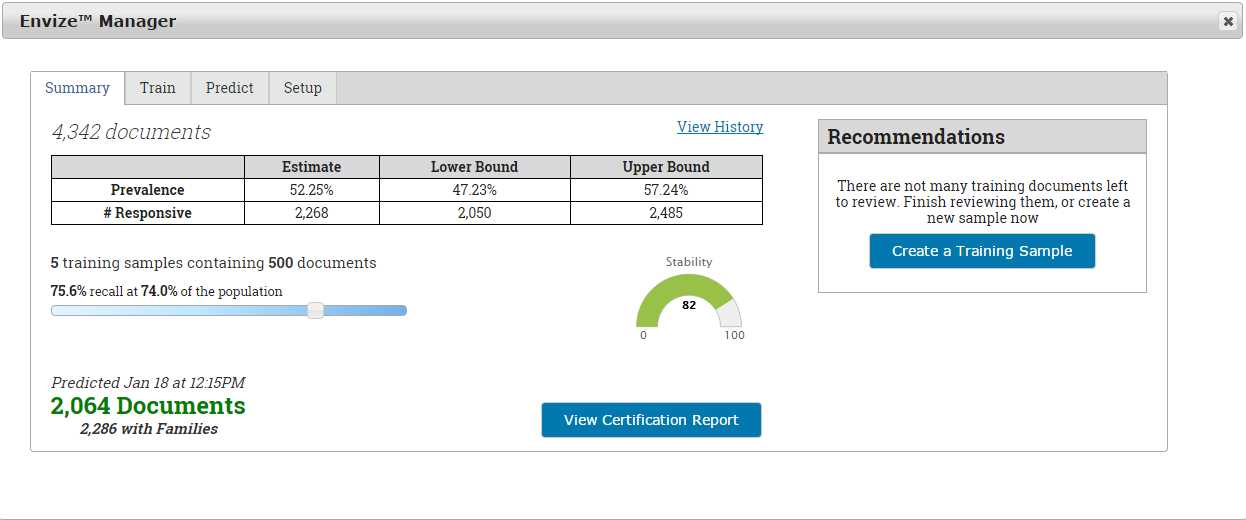
Many of the ML engines used for predictive coding today were not originally built for predictive coding.  They were in fact built on methodologies and algorithms intended for concept classification analytics and visualization (reporting) of concepts.  The clear majority of the predictive coding engines on the market today, are passive learning applications.  Passive learning applications classify ESI as a snapshot in time.  You then review representative conceptual samples from the target population that are randomly selected by the application you are using.  Once the sample is reviewed, the ML engine determines what it thinks is relevant or not relevant based on that snapshot.  Many samples are reviewed in this process, and sometimes many re-classifications must occur.  Because a passive engine is a static snapshot of the data, samples must be larger in number, and there are many starts and stops as you train the machine to determine what is relevant as opposed to what is not relevant.  Like search term validation protocols without ML, with passive ML you get to the same spot down the road as an active learning ML, it just takes you longer to get there.  One has to review dramatically more samples and you must have substantial assistance to conduct reclassification and to measure stability.”  Stability is that point where you know that the machine has learned all it is going to learn from samples, and it is time to stop training and conduct quality control audits.  Determining stabilization in a passive learning based tool can be challenging.


Active learning ML-based technology is different.  Active learning engines are usually based upon binary methods and algorithms such as Support Vector Machine (SVM), for example (Saha, Hasan, Burgess, Habib, & Johnson, 2015).  Active learning changed the game with respect to speed and efficiency.  The biggest advantage to the consumer, is that the engine continually and “actively” reclassifies what is relevant as the sample review is being conducted.  With the right active learning engine, this reclassification happens virtually in real time no matter the number of reviewers.  Feedback on how you are doing is also immediate and continuous.


So how does ML help with the all-important key term validation?  Simple: because the classification engine is classifying all documents in a targeted ESI population, allowing you to grade the effectiveness as you go, you have real-time feedback on search term effectiveness - assuming, of course, that the technology you are using has strong key term hit reporting.  With ML you are not limited to just the sample documents that you review.  The machine takes what has been reviewed, and then extrapolates that to the entire population of data.  Your search term hit report can then provide a relevancy hit rate across all data, not just what has been reviewed.  As learning stabilizes, so too do the key terms, allowing you to quickly determine which terms need work.  The technology will often suggest terms by showing you those terms that are most common in relevant documents.
Once learning has stabilized, follow a well-established audit sample review to make sure that you agree that the learning has stabilized.  It is then time to move on to privilege review and production.

Conclusion


Well-established filtering, key term validation and machine learning workflows are becoming common place and for very good reason – combining the two has proven over and over to save considerable time and money by eliminating ESI that has no value.  In our world, time is indeed money.  

References


Enclycopedia Britannica. (n.d.). Machine Learning. Retrieved from Britannica: http://www.britannica.com/EBchecked/topic/1116194/machine-learning
National Institutes of Standards and Technoloy. (n.d.). National Software Reference Library. Retrieved from National Software Reference Library: https://www.nist.gov/programs-projects/national-software-reference-library
Saha, T., Hasan, M., Burgess, C., Habib, M., & Johnson, J. (2015). Batch-mode active learning for technology-assisted review. Big Data (Big Data), 2015 IEEE International Conference on (pp. 1134-1143). Santa Clara, California: IEEE.
Samuel, A. (2000). Some Studies in Machine Learning Using the Game of Checkers. IBM Journal of Research & Development, 44(1/2), 207.

Wednesday, March 1, 2017

Part 3:  Combining Predictive Coding and Search Term Classification in 5 Easy Steps

By Mark G. Walker, VP Advisory Services and 
Robin Athlyn Thompson, VP Marketing | Business Development

This week, part 3 of our 5-part series on combining search term classification and predictive coding. In case you missed Part 1, you can find it here.  You can find part 2 here.  


Step 3: Process the Good Stuff


Once you’ve eliminated everything that you can objectively eliminate, it’s time to process.  Processing is the act of extracting metadata, content, indexing, analyzing and staging ESI for review/production.  Some steps, such as indexing content, can be a second or third stage, depending on the service provider’s capabilities.   The first stages of ingesting ESI is often referred to as pre-processing.  As noted in Step 2, all container files are opened, and individual files are created during processing.  Emails and attachments, for example, are pulled from the PST container and presented as individual files rather than a single container file.  

Once processing is complete, apply your “objective” filters identified in Step 2 again so that you can identify files coming from containers that can be suppressed from downstream processes.

Unlike prior workflows centered on applying search term filters at this stage, you SHOULD NOT filter by search terms during processing, unless you’re using terms that are validated using a process outlined in Step 4 and will not change going forward.  Even those of us expert at developing search terms should remember that using those search terms during processing may result in pulling a large percentage of irrelevant documents.  The fact is we can’t be certain how well search terms perform until we perform sample review and testing.  At minimum, we encourage you to perform these minimum tasks discussed here.

Finally, as processing extracts domains, we recommend you seek a report of domains present in the ESI and filter-out emails from domains that are clearly junk.  Emails from cnn.com, for example, may be clear spam emails.  Some processing applications have rudimentary review and tag functions designed precisely for this purpose.  Be careful, however, as anything you do in terms of filtering during processing can have a negative impact downstream.  Regardless of whether you filter out junk domains during processing, you will want to do that step (again if you did so during processing) once the ESI resides in the review/analysis platform. Here are a few things to consider during processing.  This is not intended to be an exhaustive list. 

  1. Apply Objective Filters – Apply again any objective filters that where applied during Step 2.
  2. Consider “Pre-Processing” steps – It may dramatically speed up processing to utilize a multi-stage processing work flow.  For example, you may not want to extract text and conduct indexing on files that may be filtered out.
  3. Be Careful with Search Terms - Before applying search term filters during processing, consider very carefully the consequences.  There are serious ramifications to deduplication, for example, if your search terms change and you receive new data that may apply a different set of terms.
  4. Domain Filtersidentify junk domains and eliminate files associated with clearly junk emails.

Stay tuned next week for Part 4:  Validate Key Terms Before You Agree to Them

Wednesday, February 22, 2017


Part 2: Combining Predictive Coding and Search Term Classification in 5 Easy Steps

By Mark G. Walker, VP Advisory Services and 
Robin Athlyn Thompson, VP Marketing | Business Development

This week, part 2 of our 5-part series on combining search term classification and predictive coding. In case you missed Part 1, you can find it here.

Step 2: Dump the Junk

ESI collections include acquisitions of ESI from laptops, 3rd party sites, file servers, wherever users keep potentially relevant ESI resides. In some cases, entire user hard drives are collected. In other cases, just user files are collected. Whatever the collection method, thousands, millions, even billions of files are collected. Experience teaches us that less than 1% of information collected will prove to be valuable to your case. There are an enormous number of collected files that are of no value. Here are three common objective filters that can be applied to eliminate known garbage before you do any downstream indexing, analysis or classification. This is not intended to be an exhaustive list.
  1. De-NIST – NSIT is an acronym for National Institute of Standards and Technology. The National Software Reference Library (National Institutes of Standards and Technology, n.d.) is a sub-project of NIST which collects a master list of known computer applications to help maintain the known list of application and system files. To De-NIST means you use these resources to eliminate what are known application or system files that have no value in most cases.
  2. File Type Filter - Eliminate known file types outside of NIST. In most cases, an inclusive file filter ingests into processing only specific file types of interest. Audio, video, image and other specific file types may be set aside, or not used at all. These file types are very heavy, driving up cost, contain little or no text content and are difficult to analyze, often requiring a different process and workflow. Create a special process for audio/video files that may be relevant. Your eDiscovery budget will thank you.  
  3. Date Range Filter – We would urge caution when applying a date filter BEFORE processing. Processing is the act of extracting metadata and content. This process also expands container files such as email archive PSTs and ZIP files. If you apply a date filter before processing, and container files are being processed, you are virtually guaranteed to miss files of interest. By way of example, if you create a PST archive of my email today, it will contain months and even years of email, yet the date of the PST will be today’s date. If your date range filter does not include today’s date, that PST will be eliminated from processing consideration, even though email within the date range are inside the email archive.
Next week: Part 3 "Process the Good Stuff"

Wednesday, February 15, 2017


Combining Predictive Coding and Search Term
Classification in 5 Easy Steps

By Mark G. Walker, VP Advisory Services and
Robin Thompson, VP Marketing and Business Development
iControl ESI

This is the first step in a 5 step series...Stay tuned for Step 2 next week.

Introduction

So many of our colleagues in this industry have spent decades persuading lawyers and their staffs to adopt technology and use powerful search and conceptual classification to efficiently and effectively manage eDiscovery projects.  Just last week, an attorney referred to predictive coding as a “new thing,” saying “So, Walker, you’ve been hammering home that we should do a better job with search terms, now comes this new thing “predictive coding”– what is this again and why do you recommend we change gears?”  That became the writing prompt to distill our advice on this subject to these 5 simple steps to make your team a pro. 
Those of us who support leveraging advanced analytics technology, such as predictive coding, are not suggesting a shift of the gears.  Well, at least not some of us.  Technologists (primarily) have been trying to move lawyers away from the use of key terms as “objective” filters for some time now.  A decade or so ago, conceptual search emerged in legal software.  In 2017, the most common exchanges of filters in agreement among the parties are date range, file type and search terms.  These search terms are tangible and objective things that the parties can exchange, and will behave essentially the same irrespective of what platform is being used by the parties to perform search.  For example, a search for the term “diamond” should yield the same number of documents hit whether your platform uses DT Search, Apache Solr, or some other search engine.  For better or worse, we’ve made lawyers like search terms.  Convincing attorneys to like search terms has taken us decades, so let’s not waste the effort!  The use of advanced machine learning technology, reporting, and – yes - math, will make those objective terms better.  These steps are not intended to be a comprehensive list of every step and task that should be performed on cases involving Electronically Stored Information (ESI), as there are literally entire books devoted to this topic. Rather, this is a short list of those mandatory tasks that should be performed on virtually any case of any size.

Step 1: Identify the Witnesses, Preserve and Collect the ESI

The process begins with legal hold to make certain that relevant documents/ESI doesn’t disappear.  Legal holds can be issued across an organization, or to only those that are anticipated to have relevant information and facts.  There are web-based legal hold solutions that will not only automate the process of creating legal hold, but will also help monitor compliance and profile what information the witness(es) might have that is relevant BEFORE you must gather their files. 
The exercise of “profiling the data” of a custodian is a great way to determine what a specific witness has on their computer, inside email stores, file shares or where ever relevant ESI may exist.   Data profiling applications work by reading metadata to determine file type, size, counts and so on.  This information can be very handy in determining the cost of collecting, processing, and reviewing, and helps in forecasting a budget, defending against a potential motion to compel, or seeking protection against overly broad requests -  as if that never happens!  Step 1 should include the following, at a minimum:

1.  Identify witnesses that may have relevant information;
2.  Issue a Legal Hold across the organization or specific to witnesses that are known to have relevant information.  Many legal hold applications also provide the ability to create, send and track customizable fact based questionnaires;


3.  Monitor Compliance with the issued legal hold.  We highly recommend using an automated notification and monitoring;
4.  Profile the Data of witnesses who may have relevant ESI.  Profiling the data will determine what ESI witnesses have, or have access to and will help with precise cost estimates. 


5.  Preserve and/or Collect ESI.  If an organization has "preserve in place” capability, preserve ESI for those witnesses that are expected to have relevant ESI.  Preserve in place is the ability to prevent the deletion of email for specific custodians, for example.  Some companies use “journaling” as a way to preserve in place.  If the ability to preserve in place isn’t available, collect the ESI as quickly as possible.  The longer you wait, the more likely it is that relevant information may disappear, increasing the risk of spoliation.  The delete key is not your friend!  Preserve and collect broad -- collecting ESI is the least expensive part of the process.


Next week we will cover Step 2: Dump the Junk. Your comments and opinions are welcome.